Codex CLI MCP Server for Codebase Context
Codex CLI is built to run long, mostly unattended tasks in a terminal: a migration, a refactor, a multi-file bug fix, with minimal check-ins along the way. On a small repo that works because Codex can read every file that matters. On a large one, its default context strategy is reading and grepping through source files to reconstruct structure it was never given, and that costs tokens on every turn while still missing the parts of the codebase that never got opened. A shared helper renamed in one file, three callers in files Codex never read, and the task finishes green with a broken build waiting on the other side.
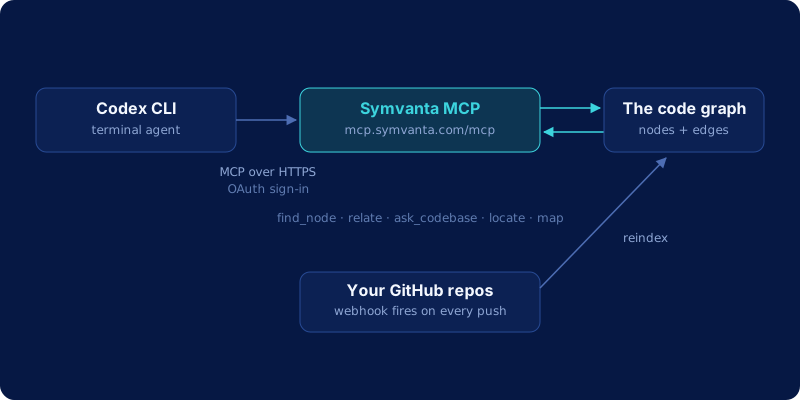
Symvanta closes that gap with an MCP server that hands Codex the actual code graph instead of a pile of text to search: exact symbol definitions and signatures, real caller and dependency edges, blast radius for a change before it ships, and cross-repo edges when the callers live in a different repository entirely.
Add MCP servers to Codex CLI
Codex keeps its MCP servers in ~/.codex/config.toml, and reads a project-scoped .codex/config.toml too when a server should only exist inside one repo. Each server is a TOML table named [mcp_servers.<name>], and the fields you set depend on the transport.
A local stdio server is a command Codex launches as a subprocess:
[mcp_servers.context7]
command = "npx"
args = ["-y", "@upstash/context7-mcp"]
env_vars = ["LOCAL_TOKEN"]

[mcp_servers.context7.env]
MY_ENV_VAR = "MY_ENV_VALUE"
command is the only required field. args, cwd, the env sub-table, and env_vars (names forwarded from your shell) are optional.
A remote streamable HTTP server is a URL:
[mcp_servers.figma]
url = "https://mcp.figma.com/mcp"
bearer_token_env_var = "FIGMA_OAUTH_TOKEN"
url is required here. bearer_token_env_var names an environment variable holding a static token, and auth picks the login method (oauth or chatgpt) for servers that run a real sign-in.
The codex mcp subcommands write the same file, so the editor is optional. codex mcp add <name> -- <command> registers a stdio server, codex mcp add <name> --url <url> registers a streamable HTTP one, and --bearer-token-env-var attaches the token variable to either. codex mcp list prints what is configured, codex mcp login <name> runs the browser login for a server that needs one, and codex mcp --help covers the rest. Codex stores the variable name and never the token value, which keeps config.toml safe to check in.
Symvanta uses the remote shape and an OAuth login, so no token variable is involved.
Setting up Codex CLI with Symvanta
- Create a Symvanta account and connect GitHub. Every plan starts with a 7-day trial and takes no card.
- Index your repos. Pick which ones Symvanta should parse into a graph. A webhook reindexes automatically on every push, so the graph Codex reads from stays current. Plans start at $19/month.
- Add the Symvanta MCP server to
~/.codex/config.toml. Codex CLI supports remote streamable HTTP MCP servers natively, configured under an[mcp_servers.<name>]table:
[mcp_servers.symvanta]
url = "https://mcp.symvanta.com/mcp"
auth = "oauth"
auth = "oauth" is the default for streamable HTTP servers, so the line above is there for clarity more than necessity. If you would rather not open an editor, codex mcp add symvanta --url https://mcp.symvanta.com/mcp writes the same table from the terminal.
- Authenticate. Run:
codex mcp login symvanta
This opens a browser for the standard OAuth PKCE flow and stores the resulting credentials for Codex to use on every session afterward. No API key to paste, no token to babysit.
- Confirm the server is live:
codex mcp list
Once symvanta shows up there, Codex can call it in any session, including the long, autonomous ones this tool is built for.
What Codex gets
| Tool | What it does |
|---|---|
find_node |
Exact symbol definition and signature, no guessing which of five matches is real |
relate |
Callers, dependencies, blast radius, implementers, and call chains, walked as graph edges |
ask_codebase |
Behavior questions ("how does X work") answered with cited file references |
locate |
Text, semantic, and config search across the indexed repo |
map |
Architecture skeleton of a repo or a specific module |
find_http_route |
Route path and method resolved straight to its handler |
diff_impact |
What a branch or diff breaks before it merges |
list_tests_for |
The tests that already cover a given symbol |
estimate_scope |
Rough sizing of a change across files and layers before Codex commits to a plan |
ref |
Pin a session to a feature branch, or overlay uncommitted edits so the graph reflects work in progress |
The graph covers TypeScript, JavaScript, Python, Java, Kotlin, C#, Go, Rust, Swift, PHP, and Ruby, so a polyglot repo gets the same precision on every language in it.
See the architecture pages for real module maps built this way on well-known open-source repos.
Long tasks surface what they break
The place this matters most is exactly the workload Codex CLI is built for: a task you kick off and check back on later, unsupervised in between. Take a migration that touches a shared authentication helper across a dozen call sites in three services. A grep-based approach finds the string, edits the definition, and reports success, because success from a text search perspective just means the pattern was found and changed. It has no way to know that two of those call sites route through an interface with a different name, or that a fourth service in a different repository imports the same helper and was never opened during the task.
Before Codex commits to that kind of change, a relate call with kind: blast_radius on the helper returns every real caller, across every indexed repository, ranked by confidence. That's the difference between a task that finishes and a task that finishes correctly: the graph doesn't stop Codex from making the edit, it stops Codex from being surprised by what the edit touches. We go deeper on why this specific failure mode is so common in agent-driven changes in blast radius analysis.
Frequently asked questions
Does this work with Codex's sandbox and approval modes?
Yes, with one thing to be aware of. Codex CLI's sandbox and approval settings (read-only, workspace-write, full access) govern filesystem and network access for the commands Codex executes, and MCP servers are configured separately in config.toml. If you run Codex in a mode with network access restricted or disabled, a remote MCP server like Symvanta's needs that access to respond, so workspace-write or full-access mode (or whatever profile in your setup permits outbound network calls) is what you want when Symvanta is wired in.
Is my code used to train anything?
No. Symvanta parses your repository into a graph of nodes and edges, that structure is what gets stored and queried. Source code itself is discarded by default after parsing and is never used for training.
Can I use the same Symvanta server in Claude Code or Cursor too?
Yes. The MCP endpoint and the underlying index are shared across clients: one repository, indexed once, queried by Codex CLI, Gemini CLI, Claude Code, Cursor, or any other MCP-compatible agent you run against the same codebase. Nothing about the setup is Codex-specific beyond the config.toml entry.
What does it cost?
Plans start at $19/month for the Starter tier. Pro is $29/seat/month, and Enterprise is $99/seat/month with a 15-seat minimum. Every plan starts with a 7-day trial and takes no card. The MCP server itself doesn't charge per call or per token; you're paying for indexed repos and seats, not per-question usage.