Claude Desktop MCP Connector: Codebase Context
Claude Desktop and claude.ai can already reason about a codebase without an IDE open: ask an architecture question in plain chat, walk a new hire through a module, or scope an impact analysis from your phone before a standup. What Claude doesn't have by default is access to that codebase. It has a chat window and whatever you paste into it.
Symvanta's remote MCP server closes that gap. Connect it once and Claude can call find_node, relate, ask_codebase, and the rest of the graph directly, in the same conversation, with no file uploads and no copy-pasting a directory tree into the prompt.
Setup
Start with a Symvanta account: create an account at symvanta.com, connect GitHub, and pick the repositories to index. Webhooks reindex on every push after that, so the graph stays current without a manual step. Plans start at $19/month. Every plan starts with a 7-day trial and takes no card.
From there, two paths connect Claude to the graph. Pick the one that matches how you use Claude.
Path 1: Custom connector (claude.ai web and Claude Desktop)
Per Anthropic's help center, custom connectors using remote MCP are available on Claude, Cowork, and Claude Desktop for Free, Pro, Max, Team, and Enterprise plans (Free accounts are limited to one connector). The steps differ slightly by plan.
Pro and Max:
- Go to Settings > Connectors.
- Click the "+" button, then "Add custom connector."
- Enter
https://mcp.symvanta.com/mcpas the server URL. - Click "Add."
- On first use, Claude opens a browser window for an OAuth 2.0 (PKCE) login against your Symvanta account. Approve it once; no API key to generate or paste.
Team and Enterprise:
- An organization Owner goes to Organization settings > Connectors, clicks "Add," then "Custom," then "Web," and enters the same URL.
- Members then go to Settings > Connectors, find the connector (labeled "Custom"), and click "Connect" to run their own OAuth login.
Because this is a remote connector, Claude calls it from Anthropic's cloud infrastructure rather than from your machine, which is also why it works identically on claude.ai in a browser and inside the Claude Desktop app: same URL, same login, same tools either way.
Path 2: Signed desktop connector bundle (.mcpb)
If you live in Claude Desktop and want a one-click install, download the signed Symvanta bundle from symvanta.com/connector/download while logged in to your Symvanta account. That page issues a .mcpb file, Anthropic's packaged desktop-extension format, pre-configured for your tenant.
Install it any of the three ways Claude Desktop supports for .mcpb files: double-click it, drag it into the Claude Desktop window, or go to Settings > Extensions > Advanced settings > Install Extension and pick the file. Claude shows an install screen with the extension's permissions before it activates.
Either path lands you in the same place: an active Symvanta connection inside Claude, and no API keys living in a config file.
What Claude gets
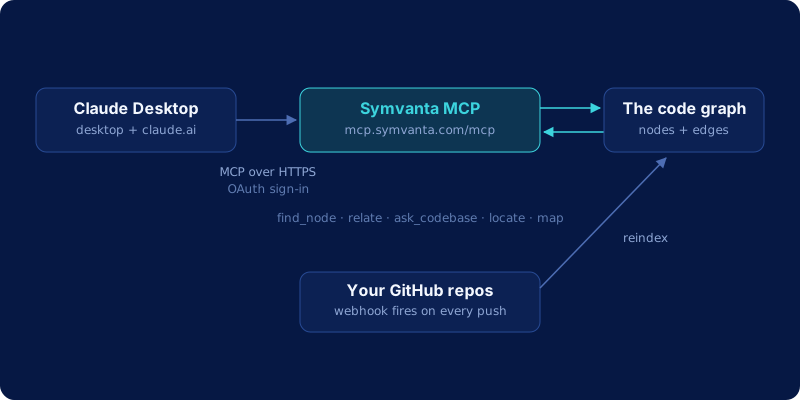
Once connected, Claude can call the same graph tools that power Symvanta's IDE and CLI integrations. Headline tools:
| Tool | What it does |
|---|---|
find_node |
Resolves a symbol to its exact file, line range, and signature |
relate (callers) |
Lists every caller of a function or method |
relate (dependencies) |
Lists what a symbol depends on |
relate (blast_radius) |
Shows what breaks if a symbol changes, across files and repos |
ask_codebase |
Answers "how does X work" questions with cited file references |
locate |
Text, semantic, or config search across the indexed repos |
map |
Renders a repo or module architecture skeleton |
find_http_route |
Jumps from an HTTP method and path straight to its handler |
list_tests_for |
Finds the tests that already cover a given symbol |
estimate_scope |
Sizes a proposed change before you commit to it |
That's 10 of the 25 tools the server exposes. Supported languages across the graph: TypeScript, JavaScript, Python, Java, Kotlin, C#, Go, Rust, Swift, PHP, and Ruby. The tools work the same whether Claude is running in a terminal agent or in a chat window, because the graph doesn't care which client is asking. For how that graph gets built in the first place, see the architecture pages.
Non-IDE use cases
This connector matters most in the moments where you're not sitting in an editor.
Onboarding. A new engineer can chat through the module map, the entry points, and the ownership boundaries before writing a single line, asking follow-up questions the way they'd ask a senior teammate.
"What breaks if we change X." A PM or staff engineer can ask that question directly in claude.ai without pulling in an IDE or a developer's time, and get a blast-radius answer backed by the actual call graph.
Code review from a phone or tablet. Open claude.ai, paste a PR link or describe the change, and ask Claude to trace the affected callers before you're back at a desk. The MCP connection means the answer comes from the live graph; Claude's memory of what the code probably does never enters it.
Why this beats a Claude Project upload
Uploading files to a Claude Project gives Claude a snapshot: accurate the day you uploaded it, stale the next time someone merges a PR. It also gives Claude text, not structure, so "who calls this function" still has to be re-derived by reading through files by hand. A live MCP connection reindexes on every push and answers connectivity questions as graph traversals: relate (callers) is a single lookup. We go deeper on that distinction in code embeddings vs. code graph.
Frequently asked questions
Is my code used to train Symvanta or Claude?
No, never. Symvanta parses your repository into a graph (nodes and edges representing symbols and their relationships) that lives in memory for querying. Source code itself is discarded by default after parsing and is not used for training.
Do I need Claude Desktop installed, or does claude.ai work?
Both work. Anthropic's documentation states that custom connectors using remote MCP are available on claude.ai, Claude Desktop, and Cowork, and that they function identically across platforms because the connection runs from Anthropic's cloud rather than from your local device. The signed .mcpb bundle is the one Desktop-only option, useful if you prefer a one-click install over pasting a URL.
How is this different from uploading files to a Claude Project?
A Project upload is a snapshot: it's accurate the moment you upload it and drifts out of date with every commit after. Symvanta's MCP connection reindexes on push, so Claude is always querying the current graph. It's also structural: a Project upload gives Claude raw file text to re-read for every question, while the MCP server gives Claude exact call graphs, so "who calls this" is a direct traversal.
What does this cost?
The MCP connection itself is included in every Symvanta plan. Plans start at $19/month. Every plan starts with a 7-day trial and takes no card. There's no separate charge for connecting Claude Desktop or claude.ai once your repositories are indexed.