Claude Code MCP Server: Give It Your Codebase
Claude Code is good at reading and grepping. Point it at a small repo and it can hold the whole thing in working context, follow an import by hand, and get the shape of a change right. Point it at a large monorepo and the same agent is still grepping, just against ten times as many false matches, burning context on files that turn out irrelevant, and guessing at the rest with the same confidence it had on the small repo.
Symvanta gives Claude Code the thing grep can't: a code graph. Instead of a string match on getUserById, it gets the exact symbol, its real signature, and every caller resolved through the graph rather than pattern-matched by name. Claude Code is the client we build this for first: this page covers both ways to wire the two together.
Connect Claude Code to Symvanta
-
Create an account at symvanta.com, connect GitHub, and pick the repositories to index. Indexing runs automatically from there: GitHub webhooks reindex the graph on every push, so you don't trigger it by hand.
-
Install the plugin (recommended). It's the fastest path and it ships more than the MCP connection: tool-routing skills and hooks that steer Claude Code onto the graph instead of falling back to its own grep.
/plugin marketplace add https://symvanta.com/plugin/marketplace.json
/plugin install symvanta@symvanta
Run
/reload-pluginsto activate it, then/mcpto complete sign-in. -
Or skip the plugin and add the plain MCP server. This gets you the tools without the skills and hooks:
claude mcp add --transport http symvanta https://mcp.symvanta.com/mcpFirst use opens a browser for an OAuth 2.0 (PKCE) login: no API key to generate or paste.
Both paths point at the same hosted endpoint, so nothing here requires you to run infrastructure. Every plan starts with a 7-day trial and takes no card, so you can run this against a real repository before you decide anything.
What Claude Code gets
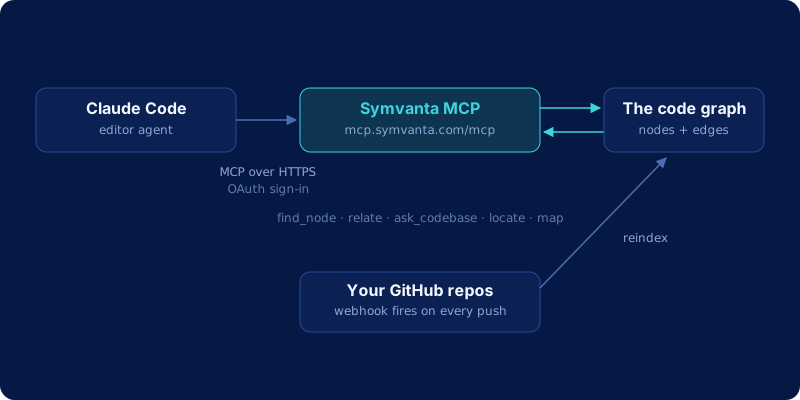
Symvanta exposes 25 tools over MCP. The ones that change how an agent navigates a large codebase:
| Tool | What it does |
|---|---|
find_node |
Resolves a symbol to its exact file, line range, and signature |
relate |
Callers, dependencies, blast radius, implementers, call chains, all as graph traversals |
ask_codebase |
Answers behavior questions ("how does X work") with cited file references |
locate |
Text, semantic, or config-key search across the repo |
map |
A repo or module's architecture skeleton |
find_http_route |
Jumps from a path and HTTP method straight to its handler |
diff_impact |
What a branch or diff breaks, before you merge it |
list_tests_for |
The tests that already cover a given symbol |
estimate_scope |
Sizes a change across files and layers before you start it |
ref |
Pins a feature branch, or overlays uncommitted edits on the graph |
Coverage runs across TypeScript, JavaScript, Python, Java, Kotlin, C#, Go, Rust, Swift, PHP, and Ruby. The architecture pages show what this output looks like on real open-source repos, walking their module maps the same way it would walk yours.
What changes in practice
Take a shared helper function used across a dozen files. Ask Claude Code to change its signature without any of this wired in, and it greps the function name, reads the files that match, and edits based on what it read. It has no way to know whether a match is a real call, a comment, or an unrelated method with the same name, and it has no way to see a caller it didn't happen to grep for.
With Symvanta connected, the same task starts with a relate call, kind: blast_radius, against the helper's node. That returns every real caller, resolved through the graph rather than guessed from a string match, across every file and every linked repository. The agent sees the actual impact surface before it writes a single edit, then makes the change knowing what it touches instead of finding out from a broken build later. Same task, same agent, the difference is whether the first step is a graph traversal or a coin flip. We go deeper on why that gap exists in why AI coding agents fail on large codebases, and on what the shorter loop does to the model bill in Sonnet plus a code graph vs Opus alone.
This doesn't replace Claude Code's own file tools. It complements them: the plugin routes code-navigation questions to the graph and leaves everything else, reading a file, running a command, writing the edit, to Claude Code as usual.
Frequently asked questions
Is my code used to train anything?
No, never. Symvanta parses your repository into a graph of nodes and edges: symbols and the relationships between them. The parsed structure is what powers the MCP tools. Source code itself is not retained by default and is never used for training.
How fresh is the index?
GitHub webhooks reindex a repository on every push to its tracked branch, so the graph stays current without you triggering anything manually. For a feature branch or uncommitted local edits, the ref tool pins the session to that branch or overlays the edits on a synthetic revision, so the agent can query work that hasn't landed on the default branch yet.
Does this replace Claude Code's built-in file tools?
No. Claude Code still reads files, runs commands, and writes edits the way it always has. Symvanta adds a second option for the specific question of "where is this" or "what does this touch": the plugin's skills steer those questions to the graph instead of a grep pass, but nothing about Claude Code's own tools changes.
What does it cost?
Every plan starts with a 7-day trial and takes no card. Starter is $19 per month, Pro is $29 per seat per month, Enterprise is $99 per seat per month. Enterprise carries a 15-seat minimum and adds on-prem deployment, SCIM directory sync, and audit logs.