Cursor MCP Server: Codebase Context and Setup
Cursor's own codebase indexing is embeddings-based retrieval: it chunks your repo, embeds it, and ranks results by similarity to whatever the agent is asking. That's genuinely good at "find code like this." It's weaker at the question that actually matters before an edit: who calls this function, and what breaks if I change it. Similarity in vector space isn't the same signal as an edge in a call graph, and an agent that only has the former is guessing at the latter.
Symvanta adds that second signal over MCP: a real code graph (nodes are symbols, edges are calls, imports, implements, instantiates) that Cursor's agent can query directly, alongside whatever Cursor's own index already gives you. The two run side by side. Keep Cursor's indexing for similarity search and add Symvanta for structure: exact symbol resolution, a real call graph, and blast radius before an edit lands.
Setup
- Create a Symvanta account at symvanta.com. Every plan starts with a 7-day trial and takes no card.
- Connect GitHub and pick the repositories to index. A webhook reindexes on every push, so the graph stays current without manual re-syncing. Plans start at $19/month.
- Add the Symvanta MCP server to Cursor. Cursor reads MCP config from
.cursor/mcp.jsonin your project root (scoped to that project) or~/.cursor/mcp.jsonin your home directory (available across all projects). For the project-level file:
{
  "mcpServers": {
    "symvanta": {
      "url": "https://mcp.symvanta.com/mcp"
    }
  }
}
To skip the file entirely, add Symvanta to Cursor in one click. The link opens Cursor's MCP settings with the server filled in.
- The first time Cursor's agent calls a Symvanta tool, it triggers an OAuth 2.0 (PKCE) browser login. Approve the connection once and Cursor holds the session for subsequent calls.
- Cursor also lists connected MCP servers under Customize in the sidebar, where you can toggle individual tools on or off if you want to trim what the agent sees.
That's the whole setup: no separate daemon, no local index to keep warm. The graph lives on Symvanta's side and Cursor's agent queries it like any other MCP tool, and every push to a linked repository triggers a reindex through the webhook, so the graph the agent queries during a session matches the branch you're actually working on, never a stale snapshot from last week.
If you'd rather keep the config out of the repo entirely, add the same block to ~/.cursor/mcp.json instead of the project file. The global file applies across every project Cursor opens on that machine, which is the better fit for a solo developer working across several repos; the project-level file is the better fit for a team that wants the MCP connection checked into version control alongside the code it's indexing.
What Cursor's agent gets
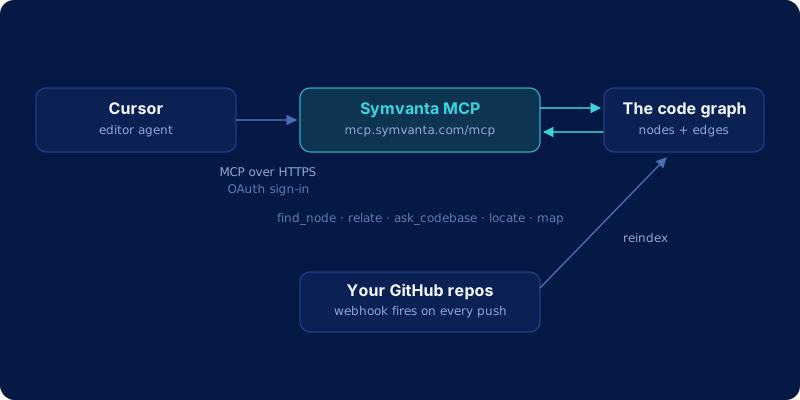
| Tool | What it does |
|---|---|
find_node |
Exact symbol definition and signature, no pattern-matching |
relate |
Callers, dependencies, blast radius, implementers, call chains |
ask_codebase |
Behavior questions answered with cited file references |
locate |
Text, semantic, or config-key search across the repo |
map |
Architecture skeleton for a repo or a module |
find_http_route |
Exact handler for a given path and HTTP method |
diff_impact |
What a branch or pending diff actually breaks |
list_tests_for |
Existing tests that already cover a symbol |
estimate_scope |
Rough sizing for a proposed change before you commit to it |
ref |
Pin a session to a feature branch, or overlay uncommitted edits |
Supported languages: TypeScript, JavaScript, Python, Java, Kotlin, C#, Go, Rust, Swift, PHP, and Ruby. These are 10 of 25 tools Symvanta exposes; the rest cover history, freshness checks, and library-level lookups.
Blast radius before you touch a shared function
Say Cursor's agent is asked to change the signature of a validateInput helper used by both the payment flow and the auth flow, three files apart, in a repo neither of you has fully memorized. Grep-and-guess retrieval finds every line containing validateInput, including a comment and an unrelated method with the same name on a different class. It doesn't tell you which calls are real.
With Symvanta wired in, the agent calls relate with kind: blast_radius on the function first. That returns the actual call sites across both flows, including any that route through an interface with a different name at the call site, before a single line changes. The same pattern applies to routing: if two controllers define near-duplicate handlers for /api/users/:id, find_http_route resolves the exact one that method and path actually hit; no plausible-looking guess required.
We go deeper on why this distinction exists at all in code embeddings vs. code graph, and you can see the same graph applied to real open-source repos on the architecture pages.
Frequently asked questions
Does this conflict with Cursor's built-in codebase indexing?
No, they compose. Cursor's index is embeddings-based and answers "what looks like this." Symvanta's graph answers "what calls this, what depends on it, what breaks if it changes." Leave Cursor's indexing on and add Symvanta as a second, structural source of context.
Is my code used to train anything?
No. Symvanta parses your repository into a graph of symbols and relationships. Source code itself is discarded by default after parsing rather than retained or used for training; an Enterprise source-storage add-on exists for teams that specifically want raw source persisted and queryable.
Does this work in every Cursor mode?
Cursor's own docs state that it automatically uses MCP tools listed under Available Tools when relevant, including Plan Mode, and that MCP tools follow the same run-mode rules as terminal commands. In practice, if a Symvanta tool is enabled in Customize, the agent can call it whenever the current mode allows tool use.
What does this cost?
Symvanta plans start at Starter, $19/month, with Pro at $29/seat/month. Every plan starts with a 7-day trial and takes no card. Enterprise is $99/seat/month with a 15-seat minimum and adds an on-prem bundle. The Cursor MCP connection itself is not a separate charge: it's included in whatever plan you're already on.