React App Architecture and Project Structure
Every React project answers the same question in its first week and then lives with the answer for years: what goes in which folder. The answer used to matter for exactly one audience, the people on the team, and it degraded slowly enough that nobody had to defend it. A second audience arrived recently. Your coding agent opens the repository with no memory of last week and no sense of which directory is load-bearing. It reconstructs both from file paths and text matches, every session, from scratch.
That changes what a good structure is worth. A layout a new hire figures out in a day is a layout an agent re-derives at the start of every task. The layouts below are the two that most React codebases end up with, what each one costs, and the dependency structure neither of them can express.
Layer folders and feature folders
The first shape sorts files by what kind of thing they are. src/components, src/hooks, src/services, src/types, src/utils. It is the shape every tutorial starts with and it is genuinely fine at twenty files, because at twenty files you can hold the whole thing in your head and the folder is just a filing cabinet.
It stops being fine at the point where one change stops being one directory. Adding a field to the booking flow now means editing components/BookingForm.tsx, hooks/useBooking.ts, services/bookings.ts, types/booking.ts, and a test three levels away. The change is coherent. The tree scatters it. Every reviewer, and every agent, has to reassemble the feature in their head from five directories that share nothing but a word in the filename.
The second shape sorts by domain. bulletproof-react is the reference layout a lot of React teams borrow from, and at commit 9506629 its Vite app splits src into app, components, config, features, hooks, lib, testing, types, and utils. The interesting directory is features, which holds auth, comments, discussions, teams, and users. Each domain keeps its own api and components directories, created only where it needs them: teams carries just api, auth just components. The booking-flow change lands in one place, and deleting a feature deletes its code.
Colocation is what makes the feature folder pay
The directory name does none of the work. What does the work is colocation: the rule that a piece of code lives as close as possible to the only place that uses it.
A component used by one feature belongs inside that feature. A hook that encodes a domain rule belongs beside the domain. The shared directories hold what at least two features really need, and the bar for promoting something into them should feel slightly high, because every promotion widens the surface anyone can reach.
The failure mode is a src/components folder that has quietly become the codebase. Forty components, half of them used exactly once, each one a candidate answer when someone searches for the thing that renders a discussion. Colocation keeps that folder small enough that its contents are actually shared, which makes the shared directory informative: if something sits there, more than one feature depends on it, and you should be careful with it.
Folders name things; they do not enforce direction
The rule that keeps a feature-sliced app from collapsing is about direction, and no directory tree can state it. Imports flow one way: app may reach into features, features may reach into the shared modules, and nothing flows back up. Feature-to-feature imports are the edge that quietly turns five modules into one.
bulletproof-react writes that rule down as lint. Its ESLint config at the same commit uses import/no-restricted-paths with one zone per feature blocking every sibling feature, then two more zones under the comment enforce unidirectional codebase: one stopping features from importing app, one stopping components, hooks, lib, types, and utils from importing either. import/no-cycle sits directly underneath, set to error.
Those two rules are the entire architecture. Everything else is filing. A convention that lives in a style document is a convention that erodes on the Friday somebody needs one function from the neighboring feature and takes it. A convention that fails CI holds.
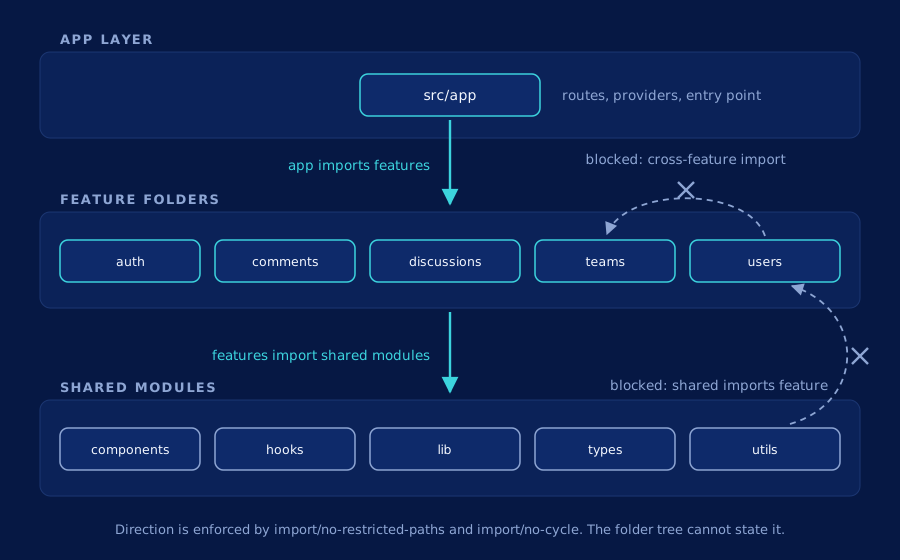
import/no-restricted-paths zones block. Layout follows the src tree at commit 9506629; bulletproof-react is MIT licensed.
Link to this diagram
Open full size
What the folder tree cannot tell you
Discipline about direction gets you a long way and then stops, because the tree describes where files sit while the risk lives in which files reach which.
React's own repository is the clearest illustration available, because nobody would call its layout careless. We indexed facebook/react at commit eafeac0 and Louvain clustering over its call edges groups the codebase into 381 functional modules at a modularity of Q=0.85, which is a clean separation for a monorepo shipping five products out of one source tree. It also contains 15 dependency cycles. The largest spans 116 files in the React Compiler's lowering passes, where the HIR, SSA, and reactive-scope stages reach back into each other's types on the way from a component to its memoized form. The next two are React DevTools' view layer (115 files), where panel components reference the views they render and the views reference the panels that host them, and the Fiber reconciler itself (91 files).
None of those three is a defect. They are the expected shape of a multi-pass compiler, a UI layer, and a tree reconciler. The point is that you cannot see any of them by reading the directory listing, and no amount of tidying the directory listing would surface them. A cycle is a property of the import edges. The tree stores names.
Your own app has the smaller version of this. Two features that never import each other still both call a shared hook that wraps a shared client, and a change to that client reaches both. The folder boundary held perfectly. The blast radius crossed it anyway.
Structure for a reader with no memory
Now put the agent back in the picture, because this is where the two audiences diverge.
A person accumulates a model of the codebase over months. An agent starts every session at zero and rebuilds one from grep. That makes the feature folder worth real money: a task scoped to discussions has an obvious first directory, the files it needs sit next to each other, and the agent reads one subtree rather than sampling five. Distinctive names help for the same reason, and we went through what that is worth and what it costs in should you rename your code for AI agents.
The ceiling shows up on the second question. Structure and naming make each round of search cheaper without changing how many rounds there are, and the number of rounds is set by how deep the call chain goes. An agent asked to change the shared client has to find the hook that wraps it, then the features that call the hook, then whatever those features expose. Every hop is another search, another set of files opened and mostly discarded. The hooks dispatcher is a nice miniature of the problem: useState resolves through a dispatcher that is swapped at render time, so the function you end up executing is not the one whose name you searched for.
When a dependency graph beats a folder convention
A folder convention answers where should this live. A dependency graph answers what happens if I change this, and those are different questions that teams often try to solve with the same tool. The second answer comes from dependency mapping: the call and import edges read back as a map of what reaches what.
Keep the convention. Feature folders, colocation, lint-enforced direction: all of it is cheap at authoring time and it pays every day, for humans and agents alike. Add the graph for the moment before an edit, when the useful output is a list of the symbols and files downstream of the thing you are about to touch, resolved through imports and calls, cutting across whatever the directory tree suggests. That question is the one we take apart in what breaks when you change a function.
Symvanta gives your AI coding agent your codebase's real call graph over MCP, so it stops guessing and knows what breaks before it edits. Exact callers, dependencies, and blast radius for any symbol in your React app, served to Claude Code, Cursor, or any other MCP client, computed per commit so the answer matches the code on the branch you are working on.
The quickest way to find out where your folder tree and your dependencies disagree is to point the graph at your own repository and read the two side by side: start a free trial, 7 days, no credit card.